

 Documentation
 Instrumentation
 Guides
 API Reference
 Changelog
You need a project with ready traces and at least one issue. Inspect and a coding agent on the Lemma Model Context Protocol (MCP) server are optional.
Open Issues
Start from the Issues table in the Lemma dashboard.
Ask Inspect
On an issue page, ask why it fired and how to fix it.
Lemma’s detection is probabilistic. An issue title is a hypothesis backed by traces, not a confirmed bug. Open the evidence before you treat the title as ground truth. See Issues and Product boundaries.
Triage, investigate, ship, and verify
1
Review the issue
Decide whether the finding is a real defect. Do not write code in this step.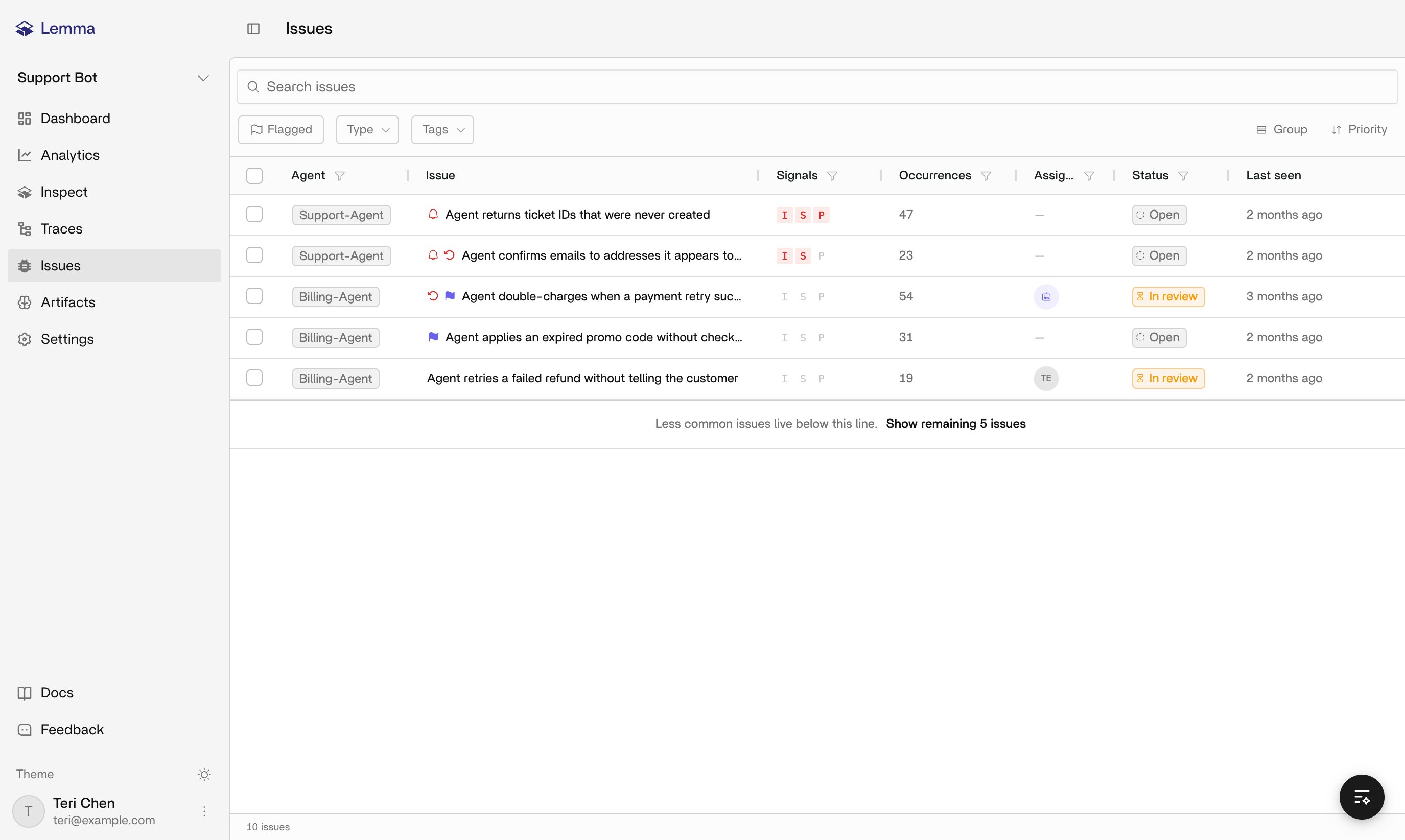
Start from an open issue in the Issues table, a Slack alert, or an Issue Brief.
- Open Issues in the project in the Lemma dashboard.
- Filter by status, agent, assignee, or search if you are choosing what to work next.
- Open the issue and read why Lemma flagged it: rationale, category, priority, first seen, last seen, and supporting-trace count.
- Dismiss it, or accept it and work it.
The issue is
dismissed with a reason, or in_progress because you accepted it as a defect.2
Inspect the supporting traces
Start from the runs Lemma grouped, not from the issue title.
You need an accepted issue with at least one supporting trace.
- Dashboard
- Coding agent
Do the following: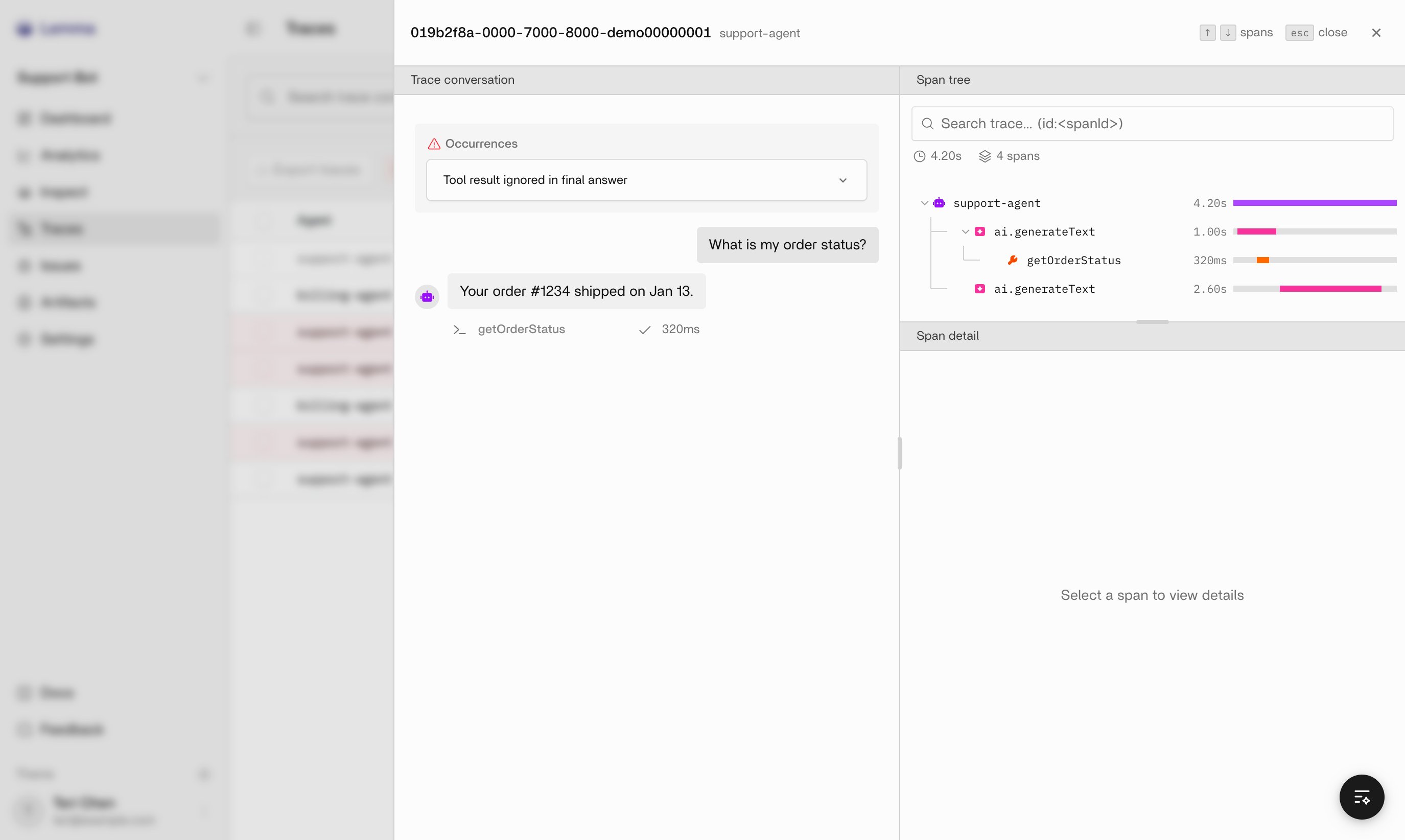
- Open more than one supporting trace from the issue, not only the newest one.
- Read Conversation for what the person using the agent saw.
- Read Execution tree for which generation, tool call, or span produced that outcome.
- Compare the assistant text to the tool results and span outputs in the same run. A mismatch between those two panels is the defect.
Ask Inspect why this issue fired.
You can say: in these traces, span X did Y, and the visible result was Z. If the traces do not support the title, return to triage and dismiss with that evidence.
3
Name the root cause and the code path
Find the mechanism. Do not restate the issue title.Do the following:
Use the span-level mismatch from the previous step.
- Map the failing span to a function, prompt, tool wrapper, or policy in your repo. Use the span name, tool name, and timestamps on the execution tree.
- Decide where the fix belongs: prompt or policy, tool or retrieval code, or a guard after the model responds. One defect can need more than one of those layers.
- Write the intended change in one sentence: “When
lookup_orderreturnsprocessing, the assistant must not claim the order shipped.”
You have a named code path and a claim you can falsify. If you cannot name the path, keep inspecting traces.
4
Implement the fix
Use your team’s development workflow. Lemma does not apply the patch.
Use the one-sentence claim from the previous step, plus the exported issue or MCP evidence.
- You edit
- Coding agent edits
Do the following:
- Make the smallest change that addresses the mechanism in those traces.
- Keep the original user prompt, tool arguments, and tool result from a supporting trace as the fixture you will replay.
- If your team files tickets, create or link a Linear ticket from the issue. Connecting Linear never files one on its own.
You have a reviewable change. Its description links the Lemma issue and quotes the evidence. Set the issue to
in_progress if it is not already.5
Verify against the original evidence
A passing unit test is not enough. Replay the scenario the traces recorded.Do the following:
Use the fixture from a supporting trace (user message, tool arguments, tool result) and a build that includes your change.
- Replay the same user turn against the same tool result, in staging or a local harness.
- Confirm the new conversation no longer produces the bad assistant text.
- Confirm the execution tree still records the tool or span you relied on. A “fix” that skips the lookup hides the defect.
- Send that run to Lemma and open the new ready trace.
- Confirm Lemma does not group the new run into the same issue.
You have at least one new ready trace for the same scenario that does not match the original failure. If it still matches, the mechanism is not fixed. Return to naming the root cause.
6
Watch for recurrence and resolve
Resolve only after production, or a production-like replay, stops reproducing the pattern.Do the following:
You have a verified change, shipped or ready to ship, and the original issue.
- Ship through your usual release path.
- Keep the issue
in_progressuntil new production traces for that agent and scenario do not match the original failure. - Resolve the issue and note the fix, including a pull request link when you have one.
- Watch the issue. Matching evidence can reopen a
resolvedissue. It never reopens adismissedone. - If it reopens, treat that as failed verification. Inspect the new supporting traces.
The issue is
resolved, or it reopened and you are investigating again with fresh traces. Slack and webhooks follow this lifecycle (issue.resolved, issue.reopened). Recurrence does not create a new Linear ticket.Dismiss and resolve are different terminal states. Dismiss means the finding is not a real problem. Resolve means the defect is fixed. Pick resolve after a verified change.
Worked example: shipped claim on a processing order
This example uses thesupport-agent from Building high-quality traces. Substitute your agent name and tool names.
Issue: “Agent tells the customer an order shipped while
lookup_order still returns processing.”What the traces show
What the traces show
You open 3 of 12 supporting traces. Each customer asks “Where is my order #1843?” Conversation shows “It shipped yesterday and arrives Friday.” Execution tree shows
lookup_order returning { "status": "processing" } with no tracking number. The generation ran after that tool result. The defect is the answer ignoring the tool output, not a failed HTTP call.What you change
What you change
Add a rule: if
lookup_order.status is not shipped, the assistant reports the current status and does not name a ship date or tracking number. A post-generation check can reject a “shipped” claim when the last lookup disagrees, then retry or fall back to a template. The pull request quotes { "status": "processing" } next to the invented “shipped yesterday” line.What verification looks like
What verification looks like
Replay “Where is my order #1843?” with
lookup_order stubbed to processing. The new conversation says the order is still processing. The execution tree still includes lookup_order. The new ready trace does not join the original issue. After that build is in production, you resolve with the pull request link. If a later trace claims shipped against a processing lookup, the issue reopens. Inspect that new tree.Related pages
Issues
Status, priority, and how to open supporting traces.
Traces
Conversation and execution-tree views for one run.
Inspect
Ask why an issue fired and how to fix it.
Lemma MCP server
Pull the same evidence into a coding agent.
Linear
Create or link a ticket after you accept the issue.
Building high-quality traces
The trace shape this investigation depends on.