> ## Documentation Index
> Fetch the complete documentation index at: https://docs.uselemma.ai/llms.txt
> Use this file to discover all available pages before exploring further.
# Artifacts
> Per-agent context, understanding documents, and decision-flow diagrams
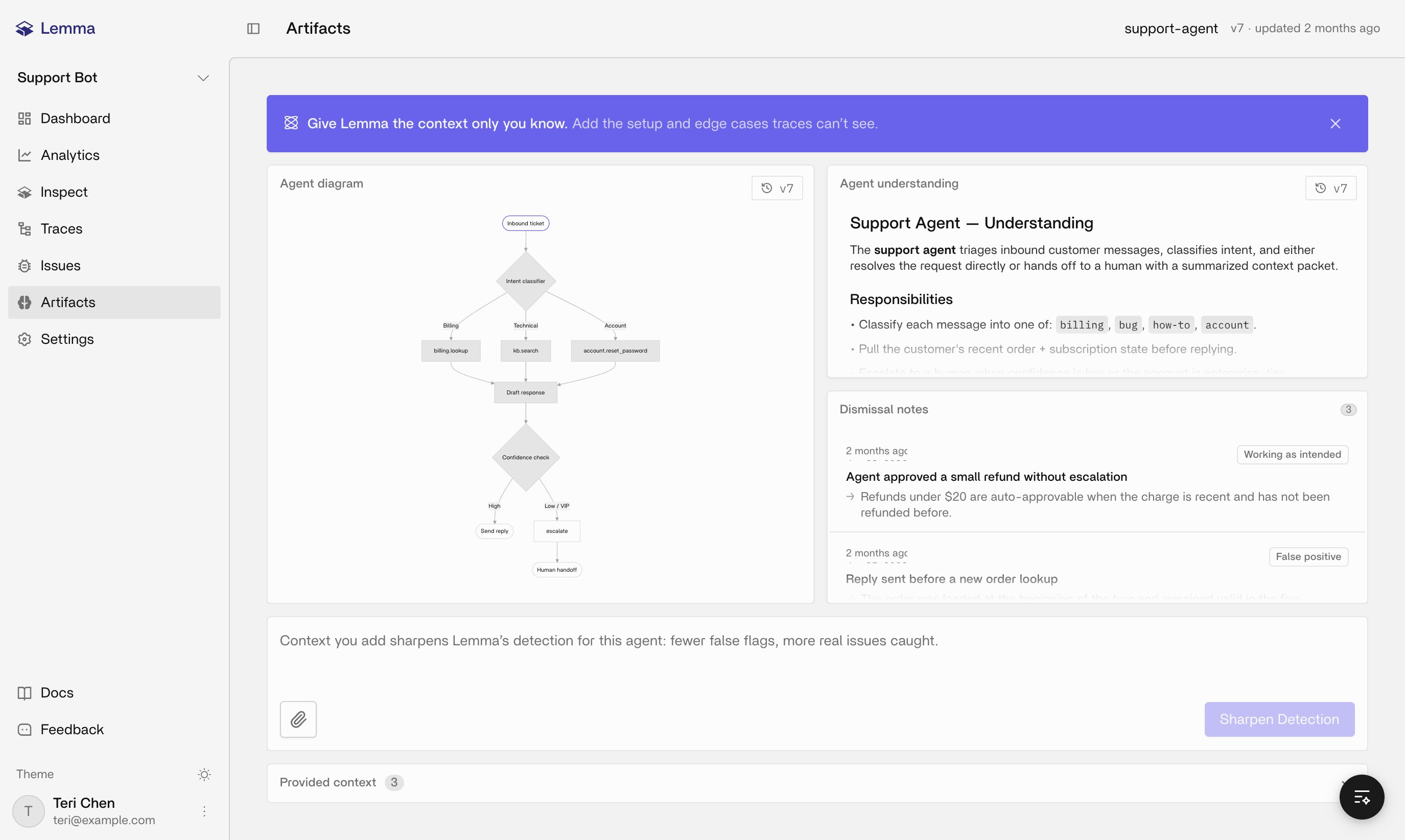
Artifacts are agent-scoped context that sharpen how Lemma interprets traces and issues for one agent. They aren't instrumentation, and they don't substitute for sending complete traces in the first place. Open **Artifacts** in a project in the [Lemma dashboard](https://platform.uselemma.ai).
Every artifact is scoped to one Lemma project plus one agent name, and agent names come from observed traces. Context you write for `support-agent` says nothing about `billing-agent`, even in the same project.
 ## Two layers
You supply **provided context**: text, or a supported text file, describing behavioral expectations, domain rules, architecture notes, or things the agent should never do. Don't upload secrets, API keys, or customer PII into it.
Lemma generates the second layer, an **understanding document** and a **decision-flow diagram**, from observed traces plus whatever context you provided. Both are versioned, so review a new version after you regenerate rather than assuming the latest draft is automatically correct.
## Setting up an agent's artifacts
Send ready traces that identify the intended agent. See [Quickstart](/tracing/instrumentation/setup).
Open **Artifacts** and select the agent, or the untagged bucket if your traces don't carry an agent name yet.
Add concise text or upload a supported text file. Favor short, testable rules over pasting in your entire prompt library.
Review the generated document and diagram. When your context changes materially, regenerate if the UI offers it, then review the new version before trusting it.
If an artifact is really project-wide or applies to an unknown agent, describe it that way instead of quietly assigning it to a named agent it doesn't belong to.
## How this helps detection
Extraction and Inspect use your context to judge whether a run violated your rules specifically, not just generic failure patterns. Sparse or contradictory notes make findings noisier, so precision here pays off. Artifacts can't create traces, register an application entity, or replace issue status and Slack alerts; they only inform how Lemma reads what already arrived.
Dismissal notes on this page log the runs you told Lemma weren't real problems, with your reasoning attached. That feedback is part of the context Lemma reads for this agent going forward.
## Inspect on this page
Because Inspect already knows the selected agent name, "this agent" resolves without you naming it. Useful prompts here: summarize what this agent does, walk through its decision flow, suggest what context to add, or list its recent issues.
## Related pages
How artifacts relate to traces, issues, and agents.
Projects, agents, and how dashboard surfaces fit together.
Failure patterns that Artifacts context can sharpen.
Ask what this agent does and what context to add.
Complete traces still matter more than extra context.
## Two layers
You supply **provided context**: text, or a supported text file, describing behavioral expectations, domain rules, architecture notes, or things the agent should never do. Don't upload secrets, API keys, or customer PII into it.
Lemma generates the second layer, an **understanding document** and a **decision-flow diagram**, from observed traces plus whatever context you provided. Both are versioned, so review a new version after you regenerate rather than assuming the latest draft is automatically correct.
## Setting up an agent's artifacts
Send ready traces that identify the intended agent. See [Quickstart](/tracing/instrumentation/setup).
Open **Artifacts** and select the agent, or the untagged bucket if your traces don't carry an agent name yet.
Add concise text or upload a supported text file. Favor short, testable rules over pasting in your entire prompt library.
Review the generated document and diagram. When your context changes materially, regenerate if the UI offers it, then review the new version before trusting it.
If an artifact is really project-wide or applies to an unknown agent, describe it that way instead of quietly assigning it to a named agent it doesn't belong to.
## How this helps detection
Extraction and Inspect use your context to judge whether a run violated your rules specifically, not just generic failure patterns. Sparse or contradictory notes make findings noisier, so precision here pays off. Artifacts can't create traces, register an application entity, or replace issue status and Slack alerts; they only inform how Lemma reads what already arrived.
Dismissal notes on this page log the runs you told Lemma weren't real problems, with your reasoning attached. That feedback is part of the context Lemma reads for this agent going forward.
## Inspect on this page
Because Inspect already knows the selected agent name, "this agent" resolves without you naming it. Useful prompts here: summarize what this agent does, walk through its decision flow, suggest what context to add, or list its recent issues.
## Related pages
How artifacts relate to traces, issues, and agents.
Projects, agents, and how dashboard surfaces fit together.
Failure patterns that Artifacts context can sharpen.
Ask what this agent does and what context to add.
Complete traces still matter more than extra context.